Short answer
The best alarm app for heavy sleepers who switch alarms off half-asleep is one where a real person is involved. With PingPal, a friend sends the alarm to your phone, records their voice or picks the song, and sees whether you sent your wake-up proof. It rings even on silent and works on iPhone and Android.
If you sleep through alarms, or turn them off and wake up an hour later, the problem usually isn't the volume. It's that nothing makes you actually get up, and nobody notices when you don't.
Below we compare PingPal with four popular alternatives, explain which kind of app suits which kind of oversleeper, and list the free fixes worth trying first. Full disclosure: PingPal is our app, and we say clearly where the others are the better choice.
The 5 apps compared
| App | Phones | How it stops you from sleeping through it | Price | Best for |
|---|---|---|---|---|
| PingPal | iPhone, Android | A friend sets the alarm, adds their voice or a song, and gets proof you're up (selfie, pose or dance video) | Free, in-app purchases | People who switch alarms off without waking up |
| Alarmy | iPhone, Android | Alarm keeps ringing until you finish a mission: math, photo, barcode, shaking, memory | Free, Premium adds more missions | Solo heavy sleepers who need to be forced out of bed |
| Galarm | iPhone, Android, web | Shared and "buddy" alarms; you're told if your buddy misses theirs | Free, Premium from $0.99/month | Families and groups who share reminders |
| Sleep as Android | Android | CAPTCHA tasks: math, shaking, scanning a QR code or tapping an NFC tag in another room | Free trial, paid unlock | Android users who like sleep tracking |
| SuperAlarm | iPhone | Missions like math, memory, barcode, walking, plus a wake-up check | Free, in-app purchases | iPhone users who want a simple mission alarm |
Why heavy sleepers sleep through alarms
Most people who "never hear" their alarm actually do hear it. The problem is what happens next:
- Autopilot: you've swiped the same alarm off hundreds of times, so you can do it without really waking up.
- Getting used to the sound: the same ringtone every morning stops feeling urgent.
- Nobody is checking: snoozing costs nothing when you are the only one who knows.
Each app below attacks one of these. Mission alarms break autopilot, varied sounds fix the second one, and social alarms fix the third. (If you regularly can't wake up or feel exhausted after a full night's sleep, talk to a doctor; an app can't fix a sleep problem.)
Free fixes to try first
Before installing anything, check what your phone's own Clock app can already do:
- iPhone: open the alarm and turn off Snooze, pick a louder sound than the default, and check the alarm volume in Settings > Sounds & Haptics (the Ringtone and Alerts slider also sets how loud alarms are).
- Android: in most Clock apps you can choose the sound, turn on gradually increase volume and shorten or limit snooze.
- Both: charge the phone on the other side of the room, so turning the alarm off means getting up.
If you still switch the alarm off and go back to sleep, that's when an app built for heavy sleepers helps.
How we chose these apps
We only included apps that (1) are available today on iPhone, Android or both, (2) have a real way to beat "autopilot" dismissing: a mission, a QR/NFC code in another room, or another person checking on you, and (3) can be tried for free. We checked each app's App Store and Google Play listing and the developer's own description on October 7, 2026. We did not lab-test the other apps; PingPal is described from first-hand knowledge, because we make it.
1. PingPal: let a friend wake you up
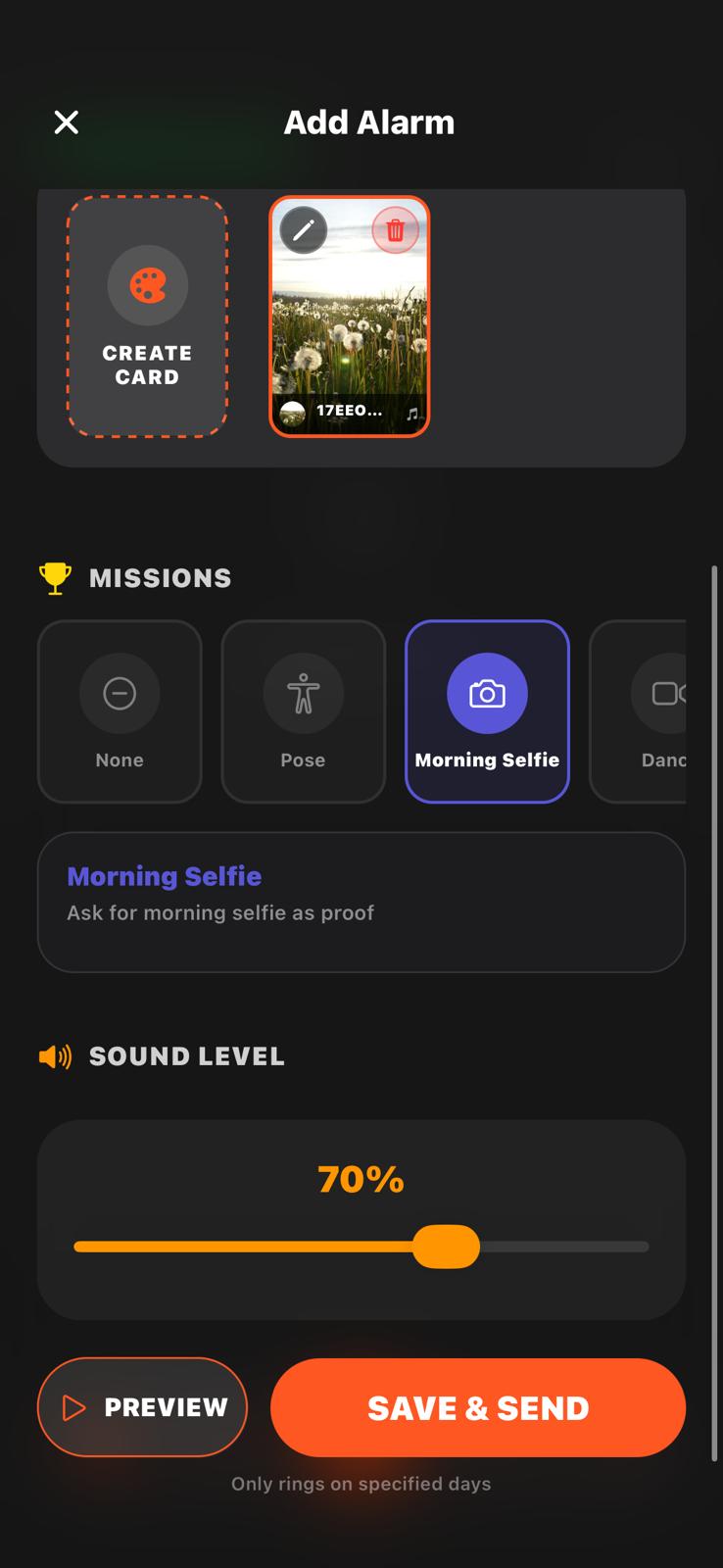
PingPal turns your alarm into something a friend sends you. They pick the time, record a voice message or choose a song, add a photo or video, and send it to your phone. It rings at that time like a normal alarm, even when your phone is on silent or Do Not Disturb, and it works between iPhone and Android.
The part that helps heavy sleepers most is the wake-up proof. Your friend can add a mission (a morning selfie, copying a pose, or a 10-second dance video) and they see whether you sent it. Turning the alarm off in your sleep doesn't help much when someone is waiting for your selfie. (More on how PingPal works.)
- Good: real accountability, alarms you can't predict (a new voice or song each time), cross-platform, free to start.
- Keep in mind: you need a friend, partner or parent who sends the alarm. The missions are proof that you're up; they don't block the alarm from being turned off like Alarmy's do.
- Best for: people who wake up, switch the alarm off and fall asleep again; couples in different cities; parents waking teens.
Want a friend to wake you up tomorrow? Get PingPal free.


2. Alarmy: missions you must finish
Alarmy is the best-known "you can't turn me off" alarm. You choose a mission and the alarm keeps ringing until you complete it: solve math problems, take a photo of a spot you registered (like the bathroom sink), scan a barcode, shake the phone, play a memory game or type a phrase. It also has options to stop you from turning the phone off while it rings.
- Good: very hard to cheat, the free version already includes the main missions.
- Keep in mind: some missions (like squats) and combining several missions need Premium. It's still just you against your alarm; nobody else knows if you went back to bed.
- Best for: solo heavy sleepers who need to be physically forced out of bed.
3. Galarm: shared and buddy alarms
Galarm is an alarm and reminder app built around sharing. You can create group alarms and "buddy alarms" for someone else; if your buddy misses the alarm you're told, so you can call them, and you see when they mark it done. It works on iPhone, Android and the web.
- Good: great for families and teams, also works for reminders like medicine or meetings.
- Keep in mind: it's a reminder tool first; there are no photo or video wake-up missions.
- Best for: families or groups who share alarms and reminders.
4. Sleep as Android: QR and NFC alarms
Sleep as Android is a sleep tracker with a smart alarm that tries to wake you in a light sleep phase. For heavy sleepers the useful part is its CAPTCHA options: math, counting sheep, shaking the phone, or scanning a QR code or NFC tag that you've put in another room. You have to get up and walk there to stop it. You can also limit how often you snooze.
- Good: the QR/NFC trick gets you out of bed, and you get sleep data.
- Keep in mind: Android only, and the full version is paid.
- Best for: Android users who like tracking their sleep.
5. SuperAlarm: simple missions on iPhone
SuperAlarm is an iPhone alarm with loud sounds and wake-up missions: math, memory games, scanning a barcode or an object, Face ID and walking. A wake-up check makes sure you didn't drift off again after dismissing it.
- Good: easy to set up, several mission types, widgets.
- Keep in mind: iPhone only; similar idea to Alarmy with fewer options.
- Best for: iPhone users who want a lighter alternative to Alarmy.
Which one should you pick?
- You switch alarms off without waking up: PingPal. A person checking on you works when no task can.
- You wake up but snooze for an hour: Alarmy or SuperAlarm, with a photo or barcode mission in another room.
- You're on Android and want sleep data: Sleep as Android with a QR code in the bathroom.
- You want to share alarms with family or a team: Galarm.
They also combine well: Alarmy on your own phone for a normal day, and a PingPal alarm from a friend on the mornings you really can't miss, like a flight or an exam.
Tips that make any alarm work better
- Put the phone across the room. Walking to it does half the work of waking up.
- Change the sound often so your brain doesn't learn to ignore it. Pick something loud and unfamiliar, and swap it every week or two.
- Plan the first two minutes: lights on, glass of water, feet on the floor.
FAQ
What is the best alarm for a heavy sleeper?
It depends on how you sleep through it. If you turn alarms off on autopilot, a social alarm like PingPal works best because someone else is checking. If you wake up but keep snoozing, a mission alarm like Alarmy that won't stop until you finish a task is the stronger choice.
How do I stop sleeping through my alarm?
Make turning it off take effort (a mission or a QR code in another room), change the sound regularly, put the phone out of reach, and add accountability: a friend who sends the alarm and expects a morning selfie.
How can I wake up a heavy sleeper through the phone?
Calls and texts are easy to sleep through on silent. An app like PingPal lets you send a real alarm to their phone that rings even on silent, with your voice on it. Our guide on how to send an alarm to someone's phone compares all the options.
What is the best alarm app for heavy sleepers on iPhone?
On iPhone, PingPal (alarms sent by a friend), Alarmy and SuperAlarm (mission alarms) are the strongest options. Sleep as Android is not available on iPhone.
Related: send an alarm to another phone with PingPal · how to wake up your partner when you're miles apart · all blog posts
Sources: each app's App Store and Google Play listing and the developers' own feature descriptions, checked on October 7, 2026. Features and prices change; check the store page before you pay.